
Simple, Powerful and Offline File Compressor
Compress PDF, PowerPoint, Word, Excel, JPEG, PNG & TIFF files with NXPowerLite Desktop
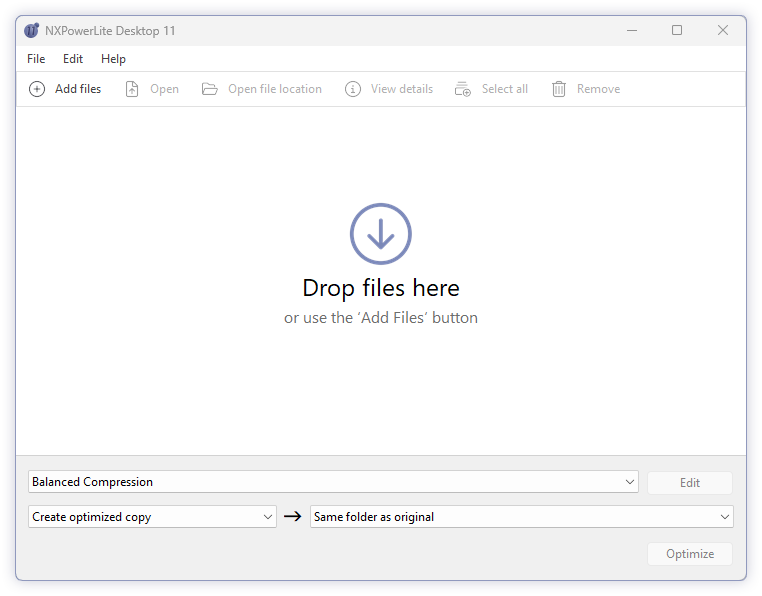
What is NXPowerLite Desktop?NXPowerLite Desktop is an offline file compression utility for Windows and Mac created by Neuxpower. Unlike standard ZIP compression, NXPowerLite shrinks PDF, Microsoft Office (PowerPoint, Word, Excel), and image files (JPEG, PNG, TIFF) by up to 95% while keeping them in their original file format and extension. It features automatic Outlook email attachment integration, batch compression for up to 10,000 files, and native right-click Explorer/Finder integration.
Trusted by 3+ million happy customers




“We're simply amazed at the results. We are getting 80% to 95% reduction in file sizes, not to mention download times. Simply put, this is one of the best pieces of software I have ever used.”
— Manulife Financial
Fully featured and simple to use
Custom profiles
Create custom settings profiles and quickly select them from the home screen for a great productivity boost.
Explorer integration
Compress files directly from Windows Explorer using the right-click menu options.
File size audit
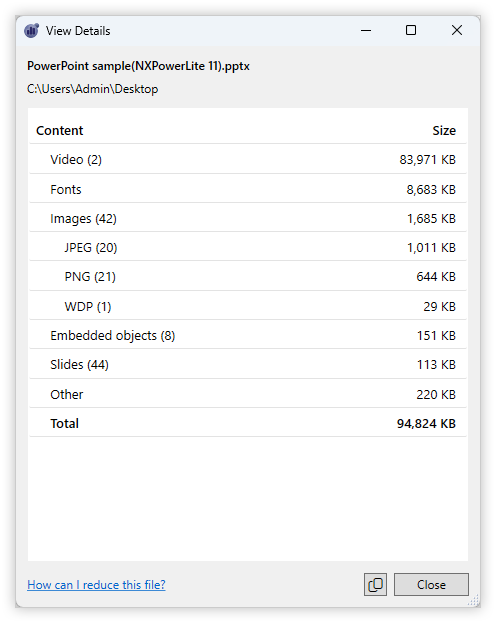
Gives you an instant, multi-format file size breakdown, to see what is taking up space in your files.
Batch File Compressor
Compress up to 10,000 files at a time. Great for compressing small folders of content quickly.
For server compression see:
NXPowerLite Server
Compress files for email
Automatically compress Outlook email attachments as they are sent. Also compress large attachments you receive in Outlook.
Same file format
Compressed files stay in the same format with the same file extension. You don't need NXPowerLite to open compressed files.
Zip compression
Leave files in their original format or optionally collect them together into a single Zip file.
Bulk deployment
NXPowerLite Desktop is available as a Windows Installer .MSI file for easy installation on multiple desktops without needing user interaction.
Business evaluation
We are happy to offer business customers the option to try NXPowerLite Desktop over 30 days without restriction, for up to 50 people.
NEW! File Size Breakdown
NXPowerLite Desktop now includes a unique file size audit tool for Microsoft Office and PDF files. It identifies size contributors and content preventing compression.
This size audit complements our file size analysis guides for manual content compression tips.
Loved by millions
Join millions of PowerPoint designers, consultants, researchers, and realtors who are free from worrying about large files.
“NXPowerLite does what I had thought to be impossible - truly transformative compression of giant PDF presentation files. Getting our slide decks down to shareable form has been a constant challenge (Think, running your PDF compressor over and over to get an 18.8MB file down to 17.9MB.) This little program has changed everything.”
Katharine Gray
Uncompromised Creative

“I have used NXPowerLite countless times to reduce the size of bloated PowerPoint and PDF files! My clients are astonished at how much smaller their files are while retaining image fidelity. This is a must-have tool!”
Laura Foley
Laura M. Foley Design

Capabilities Summary
| Feature / Capability | Supported Specifications |
|---|---|
| Operating Systems | Windows and macOS |
| Supported File Formats | PDF, PPT/PPTX, DOC/DOCX, XLS,XLSX, JPEG, PNG, TIFF (It can also compress these file formats inside zip archives) |
| Output File Extension | Preserves native extensions (Does NOT convert to another format such as .zip) |
| Email Integration | Automatic compression in Microsoft Outlook (2007-2024 & M365) |
| Batch Processing | Up to 10,000 files per batch |
| Internet Requirement | 100% Offline (No file uploads required; enhanced data privacy) |
| Max File Size Limit | No maximum file size limit (Compresses files 50MB-1GB+) |
| Licensing | Perpetual license ($59 one-off fee, no monthly subscription) |
Frequently Asked Questions
If you have any other questions or feedback, please contact us and we’ll get straight back to you.
-
No. NXPowerLite compresses PDF, Office, and image files while maintaining the original file format extension. You don't need NXPowerLite to open compressed files.
-
Yes. NXPowerLite Desktop is 100% offline software installed locally.
-
NXPowerLite is licensed per user rather than per machine, so if you buy a license you can install it on up to 3 machines so long as you are the only user of the software.
Licenses are perpetual, so they don't expire. Once you buy a license you can use that major version of the software for as long as you want without paying additional fees.
-
Volume discounts start at 10 users, so the more licences you buy the less you pay per user. Visit our support site for more information on multi-user licensing.
If you work at a non-profit then simply email us with your work email address to help us verify your details and we will then send you out a discount code.
-
Windows 10 and above
NXPowerLite integrates with 32 & 64-bit versions of the following applications (Versions 2007 - 2024 & M365):
Microsoft PowerPoint
Microsoft Word
Microsoft Excel
NXPowerLite can automatically optimize email attachments in the following email clients:
Microsoft Outlook (2007 - 2024 & M365) [32-bit & 64-bit]
-
PDF Documents (*.pdf)
Microsoft PowerPoint 97-2024 + M365 presentations (*.ppt; *.pptx; *.pps; *.ppsx; *.potm; *.ppsm; *.potx; *.ppa; *.ppam)
Microsoft Word 97-2024 + M365 documents (*.doc; *.docx; *.dot; *.dotm)
Microsoft Excel 97-2024 + M365 spreadsheets (*.xls; *.xlsx; *.xlt; *.xltm; *.xla; *.xlsm; *.xltm; *.xlam)
JPEG images (*.jpg; *.jpeg; *.jpe; *.jif; *.jfi)
PNG images (*.png)
TIFF images (*.tiff; *.tif)
All the above file formats when found within zip archives.
-
NXPowerLite Desktop is available in the following languages:
English
Chinese (simplified)
Chinese (traditional)
Dutch
French
German
Italian
Japanese
Korean
Portuguese (Brazil)
Spanish
-
You can retrieve your NXPowerLite Desktop key at any time with our software key reminder.
-
Yes, separate versions are available for both Windows and macOS operating systems.